
Amps, pedals and cabinets
OpenRig has five built-in blocks that play a file: a Neural Amp Modeler capture or an impulse response. Each one only offers the files that make sense in it.
| Block | Plays | Typical use |
|---|---|---|
| Amp | NAM captures of an amp head | Followed by a Cabinet |
| Amp + Cab | NAM captures of a combo, or an amp with its cab and mic | Alone, no Cabinet after it |
| Pedal | NAM captures of pedals, preamps and studio gear | Before the amp |
| Cabinet | Impulse responses of a speaker cabinet | After an Amp |
| Space | Impulse responses of a room or a reverb | At the end of the chain |
The neural blocks run NeuralAudio, the engine of the NAM LV2 plugin, natively: the model is part of the chain and saved in presets.
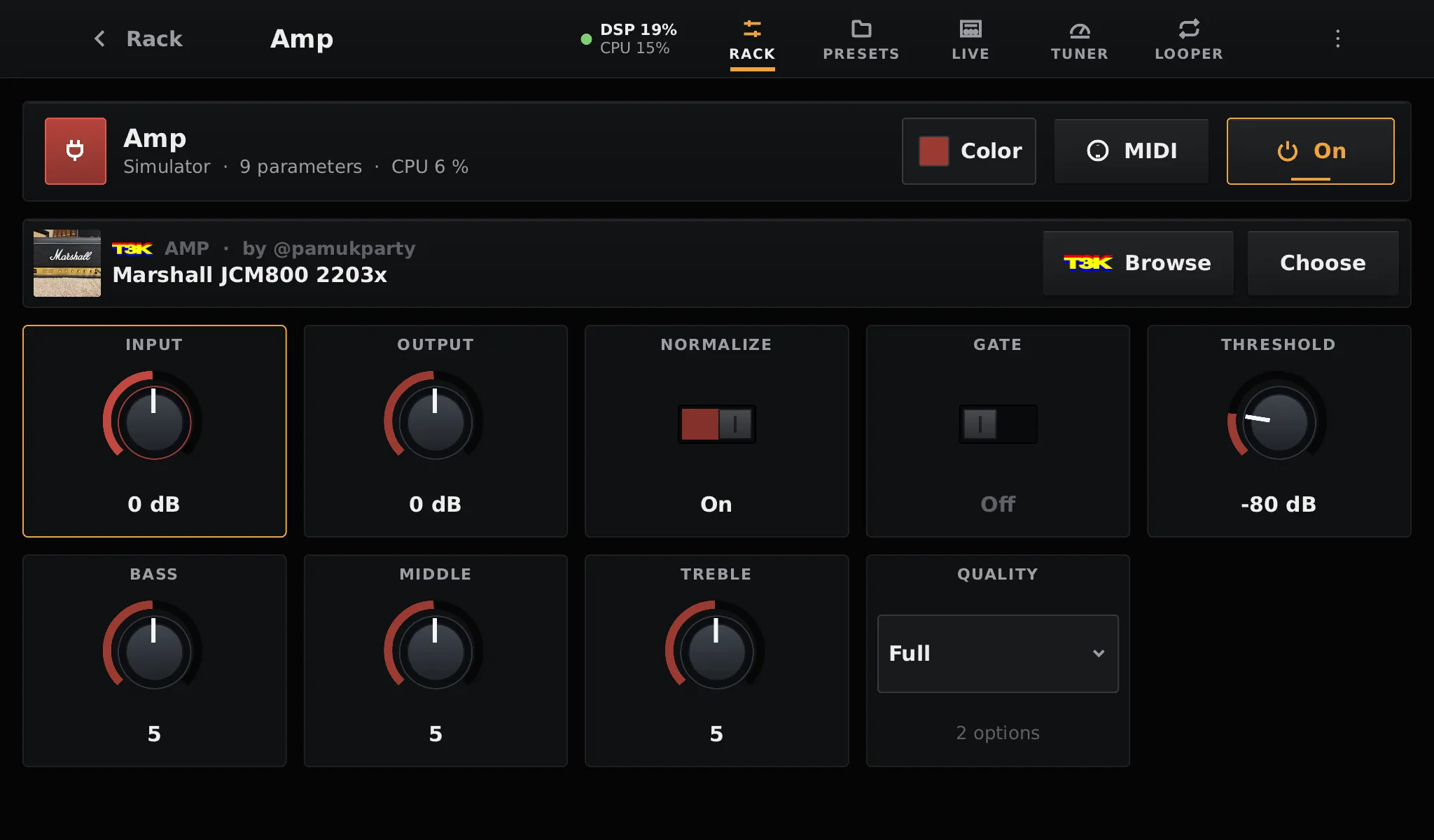
Amp and Pedal controls
Section titled “Amp and Pedal controls”| Control | Range | What it does |
|---|---|---|
| Input | −24 to +24 dB | Drive into the model |
| Output | −24 to +24 dB | Level after the model |
| Normalize | on / off | Use the levels recommended by the capture, so captures play at similar loudness |
| Gate | on / off (off) | Noise gate |
| Threshold | −100 to 0 dB (−80) | Level under which the gate closes |
| Bass, Middle, Treble | 0 to 10 (5 is flat) | Tone stack, on Amp and Amp + Cab only |
| Quality | Full / Light | Size of the model, only for captures that hold two sizes |
The gate and the tone stack work like those of the NAM plugin, so the same settings sound the same:
- The gate listens to the clean input of the block and turns down the model’s output: it follows your playing, not the hiss the capture adds. One gate on the first high-gain block is usually enough.
- The tone stack is three filters after the model: low shelf at 150 Hz, peak at 425 Hz and high shelf at 1.8 kHz. Centred, it costs nothing. Pedals have none: their capture already includes their tone knob.
Quality
Section titled “Quality”TONE3000 serves recent (A2) captures as one file holding two sizes. Light costs about a quarter of Full, for a slightly less accurate tone: a good choice for a booster before the amp, or to fit more blocks. It switches while you play, without a dropout. A full A2 capture uses about 12 % of one Raspberry Pi 5 core at 128 frames.
Cabinet and Space controls
Section titled “Cabinet and Space controls”| Control | Range | What it does |
|---|---|---|
| Level | −24 to +24 dB | Level of the convolved signal |
| Mix | 0 to 100 % | Dry / wet balance: 100 % on a Cabinet, 35 % by default on a Space |
| Normalize | on / off | Scale the response to unity gain over 80 Hz – 5 kHz |
| Low cut | 20 to 500 Hz | High-pass on the wet signal (boomy cab, muddy reverb) |
| High cut | 1 to 20 kHz | Low-pass on the wet signal (fizz, bright rooms) |
Impulse responses are .wav files at any sample rate, up to 10 seconds. They play with no
latency: long room responses are convolved partly on a worker thread, so the cost of the block
stays flat.
Your own files
Section titled “Your own files”Captures and impulse responses are read from the models folder of the data partition,
subfolders included. A tone is a folder of captures of the same gear; a file on its own is a
tone with a single capture.
models/├── Plexi Crunch.nam├── My Rig/│ ├── clean.nam│ └── crunch.nam└── Tone3000/ ← downloads from the TONE3000 librarySupported files: .nam (WaveNet, LSTM, A1 and A2), RTNeural .json, AIDA-X .aidax, and
.wav impulse responses. To copy files to the pedalboard, see SSH and logs.
Presets store the path of the model relative to models, so presets and models can move to
another pedalboard together.